Category Archives: SharePoint

All SharePoint related posts

Bizarre Problem Using a Custom User Control as a Delegate


I was creating what I thought was a very simply custom user control to be deployed as a delegate in order to enable custom analytics on a SharePoint site.  Everything came together quickly and I deployed the solution via Visual Studio, reloaded the site but my custom control was nowhere to be found.

The custom control’s ASCX file is deployed to a subfolder of the CONTROLTEMPLATES folder as per best practices but no matter what I did the control would not load.  The ULS logs showed the theoretically simple “User control “~\_controltemplates\Analytics\FooterCalls.ascx” is not in safe control list.”.  I rechecked everything related to SafeControls, directories, features, activation and deployment but everything was as it should be.

It turned out that the problem had nothing to do with SafeControls but was actually in my Elements.xml file where I was activating the control as a delegate.  The line that was causing the issue was:

<control id="FormFooter" sequence="110" controlsrc="~\_controltemplates\Analytics\FooterCalls.ascx" />

This particular portion of SharePoint is apparently very sensitive to the direction of the slashes.  Changing them to forward slashes fixed the problem.

<control id="FormFooter" sequence="110" controlsrc="~/_controltemplates/Analytics/FooterCalls.ascx" />

Hopefully this will save someone the hours I spent tracking this less than obvious fix down.
April 2012 Cumulative Update – All Changes


Here is a single list of all of the changes that Microsoft has included in the April 2012 CU.  I had to prepare this list for work so figured I might as well share it and it might save people from having to click through all of those KB’s to put together the info

Click to read the full post

SharePoint Updates and Service Pack links


I’ve been looking for official links to all SharePoint service pack and version history information for some time and have only been able to find various blogs out there, none of which are updated regularly.  Fortunately, Microsoft actually does have official pages for updates and service packs.  Here are the links (mostly so I don’t lose them again 😉 )

Official Microsoft Pages

There is also an RSS Feed for updates to all office products that includes all version of SharePoint, among other things.

Microsoft also has pages that show all of the specific version numbers for SharePoint by Product/Service Pack/Cumulative Update and, best of all, they are current as of this writing – including the August 2013 Cumulative Update.

Hopefully these will help more people than just me as these official pages were never near the top of my Google searches for any SharePoint topic and were hard to find if you weren’t searching on just the right keywords.


Update 09-Sep-2013 – Added links for SharePoint 2013 and revised text to reflect the changes

One More Reason to Love ULS Viewer


If you do any work with SharePoint then you probably already know about the incredibly wonderful tool that Microsoft gave us called ULS Viewer.  This tool allows you to watch and filter your SharePoint logs in real-time or after-the-fact so that you can find key events.

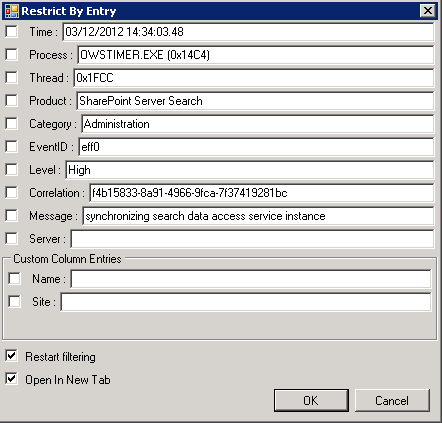
Apparently they added something else in there to be grateful for – ‘New Page By This Item’.  Simply right-click on one of the entries in the list, select that option and you are presented with a dialog like the one below. 

ulsfilters

Make your selection for your filter, click ok and now you have a new tab based on that selection.  If you are filtering on a past event, make sure to uncheck the ‘Restart filtering’ option so that it will pull from the current log instead of starting fresh.

Why is this so wonderful?  Well, if you are doing a lot of real-time monitoring of the logs, you know how much noise there is in there, making finding critical information difficult as things scroll by so fast.  So, you set up filters (usually a lot of them) to cut down on the noise.  Normally, when you filter for something, i.e. a Correlation ID, you have to scrap all of your live filters so that you can see all of the entries associated with the ID.  Using this method however, the tab that you are using for live monitoring continues normally but now you have a new tab that lists everything associated with just that ID.